





Tired of jumping between tools and manually moving customer feedback from one system to another? As customer experience programmes grow more sophisticated, many organisations find themselves stuck with fragmented data, disconnected tools, and slow manual workflows.
Customer experience integrations solve this problem. By connecting your CX platform with the systems you already use, such as CRM, support tools, product platforms, and data warehouses, you can automate feedback collection, act on customer sentiment in real time, and turn insight into action without adding complexity. In this article, we explore what customer experience integrations are, why they matter, and how organisations use them to build faster, more effective, and more connected customer experience operations.
Why customer experience integrations matter
Customer experience integrations help you to automate your customer experience. The logic of this type of integration is the same as any other type of integration you can do with other tools. Modern customer experience work rarely happens in a single tool. Customer data lives across CRM systems, support platforms, product analytics tools, marketing automation, and internal databases. When these systems are not connected, teams lose time, insight, and momentum.
Customer experience integrations create a continuous flow of information between systems. Instead of manually exporting data, copying feedback, or reacting days later, teams can respond to customer signals as they happen. The result is a more proactive approach to CX, where feedback is not just collected, but immediately routed to the people and processes that can act on it.
What customer experience integrations actually do
At a basic level, an integration connects two or more systems through APIs so that data can move automatically between them. In a customer experience context, this means connecting feedback data with operational and business systems.
Customer experience integrations typically enable organisations to:
- automatically collect feedback from multiple sources
- enrich feedback with background data such as customer segment, value, or lifecycle stage
- trigger actions when specific feedback is received
- export analysed feedback for deeper reporting or modelling
The key benefit is automation. Once an integration is set up, data flows continuously without manual effort, allowing teams to focus on improvement rather than administration.
Key benefits of customer experience integrations
Save time and eliminate manual work
Manual data handling slows down CX programmes and increases the risk of errors. Integrations remove the need to move feedback between tools by hand, freeing up time for analysis and action.
Act proactively in real time
When feedback flows instantly, teams can respond faster. Negative feedback can trigger follow-ups, alerts, or tasks immediately, rather than days later when the moment has passed.
Increase insight and actionability
By combining feedback with contextual data from CRM or support systems, insights become more meaningful. Teams can prioritise actions based on customer value, segment, or behaviour instead of treating all feedback the same.
Common customer experience integration use cases
Customer experience integrations can support many different use cases, depending on your goals. Below are some of the most common and impactful examples.
Collect customer feedback from multiple systems
Feedback is often collected across several platforms, including CRM systems, support tools, product environments, and external review sites. Customer experience integrations make it possible to centralise all of this feedback in one place.
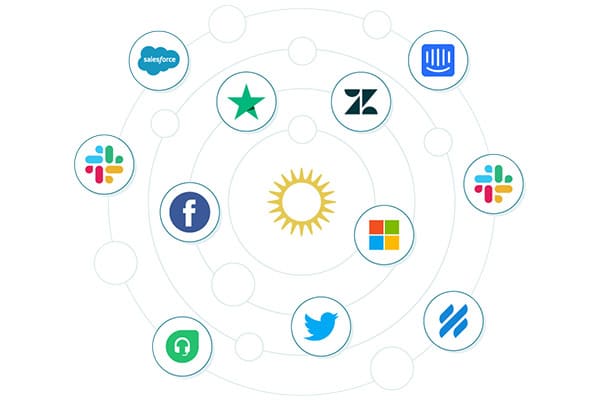
For example, feedback collected in systems such as Salesforce, Intercom, Microsoft Dynamics, or Zendesk can be automatically sent to your CX platform. This ensures that no insight is lost and that feedback from different touchpoints can be analysed together.
Integrations can also connect to databases or data warehouses where customer responses are stored, allowing organisations to stream feedback directly into their experience analytics environment.
Send survey invitations from your CRM
Many organisations prefer to manage survey invitations through their CRM system. This approach gives full control over who receives a survey and when, while still centralising responses for analysis.
By setting up automated workflows in your CRM, survey links can be sent after key interactions such as onboarding, support resolution, or milestone events. Background variables such as customer segment or account value can be passed along with the response, adding valuable context to the feedback.
This approach also supports stronger privacy and compliance practices, since customer data remains governed by existing CRM permissions.
Trigger actions automatically when feedback is received
One of the most powerful uses of customer experience integrations is automation.
When feedback is analysed in real time, specific responses can trigger actions automatically. For example:
- creating a support ticket when a customer leaves negative feedback
- notifying teams in Slack when critical issues emerge
- launching a follow-up campaign for dissatisfied customers
Imagine a mobile app where users complain about performance issues that have already been fixed in a recent release. With the right integrations in place, customers using an older version can automatically receive a message encouraging them to update, resolving the issue without manual intervention.
This type of automation reduces pressure on support teams while improving response speed and customer satisfaction.
Export enriched feedback for advanced analysis
Customer experience integrations also make it possible to export analysed feedback programmatically. This includes not just raw responses, but enriched data such as sentiment, themes, and topics identified through AI-driven analysis.
Data teams can combine this information with internal data that may not be shared directly with CX platforms, such as purchase history or geographic information, enabling deeper analysis and modelling.
Collect and analyse public online reviews
Customer experience does not stop at owned channels. Public feedback from app stores, review platforms, and forums provides valuable insight into how customers talk about your brand online.
Customer experience integrations can continuously collect public reviews and deliver them into your CX platform for analysis. This allows teams to track sentiment over time, identify recurring issues, and benchmark performance against competitors.
Because this feedback is publicly available, organisations can also analyse competitor reviews to uncover gaps in the market and identify opportunities for differentiation.
How customer experience integrations work in practice
Although integrations may sound complex, most follow a straightforward pattern. A source system, such as a survey tool or CRM, provides secure access through an API. The integration listens for specific events, such as a new response or ticket closure, and transfers the relevant data automatically.
Organisations can control exactly which data fields are shared, ensuring that only necessary information is included. This makes it possible to respect privacy requirements while still capturing meaningful insight.
Once configured, integrations run continuously in the background, enabling real-time feedback flows without ongoing maintenance.
Building a connected CX stack with Netigate Insights
Netigate Insights is designed to sit at the centre of a connected customer experience ecosystem. With open APIs and prebuilt integrations, it connects feedback from across your organisation and turns it into actionable insight.
By integrating Netigate Insights with CRM systems, support platforms, digital channels, and data warehouses, organisations can:
- unify feedback across all touchpoints
- understand what drives key CX metrics
- automate actions and close the feedback loop
- scale customer experience work without adding manual effort
Customer experience integrations are no longer a technical nice-to-have. They are a foundational capability for organisations that want to move faster, act smarter, and deliver consistently better customer experiences.
When feedback, systems, and action are connected, customer experience becomes a powerful driver of growth rather than a reporting exercise.